How Does a Desktop AI Decide When to Click and When to Code?
Microsoft's Mage-VL-Cowork learns both GUI actions and terminal work. The harder part is choosing between them without losing track of state.
On this page
Give an AI a spreadsheet and ask it to merge a heading, add a chart and save a copy.
It could select cells, open menus and navigate dialogs. It could also write a short script that edits the workbook directly. Both routes might produce the same file, but they create very different work for the agent.
Now imagine the workbook has unsaved changes in the application. Editing the file on disk might touch an older version. Suddenly, choosing the faster tool is only part of the problem.
This is what caught my attention about Microsoft's Mage-VL-Cowork, whose model-weight release commit is dated October 30, 2026.
It is a small vision-language model trained to choose between graphical interaction and terminal execution within one policy. A vision-language model can interpret images alongside text; here, those images are screenshots of a working desktop.
The interesting question is:
How do we teach an agent to choose the right way of doing the work?
Why would an agent need both routes?#
The graphical interface is useful when the task depends on what is currently visible: a selected layer, an open dialog or the layout of a finished slide.
Code is useful when the operation has a clear structure: update particular cells, inspect a document or check that an output file contains the expected objects.
Consider this hypothetical workbook task:
| Part of the job | Route I would consider | What still needs checking |
|---|---|---|
| Change a known set of cell values | A workbook library | Formulas and unrelated content survived |
| Adjust a chart until its labels are readable | The application interface | Actual rendered layout |
| Confirm the output was saved | Inspect the file, then reopen it when needed | Saved content matches the intended result |
These are proposed choices, not results from a test I ran.
The two routes see different things. A file library sees stored structure. The application may hold newer state in memory. A useful hybrid agent has to manage that relationship, rather than treating every terminal command as a shortcut.
What did Microsoft actually build?#
According to the model card, the model selects between computer_use, which operates through screenshots and mouse or keyboard actions, and bash, which executes commands in a persistent environment.
The same policy chooses the route each turn. There is no separate model acting as a channel router, although surrounding software still has to execute actions and return observations.
That distinction matters. “One policy” does not mean the weights contain a working desktop, a Python installation and permission to open every file.
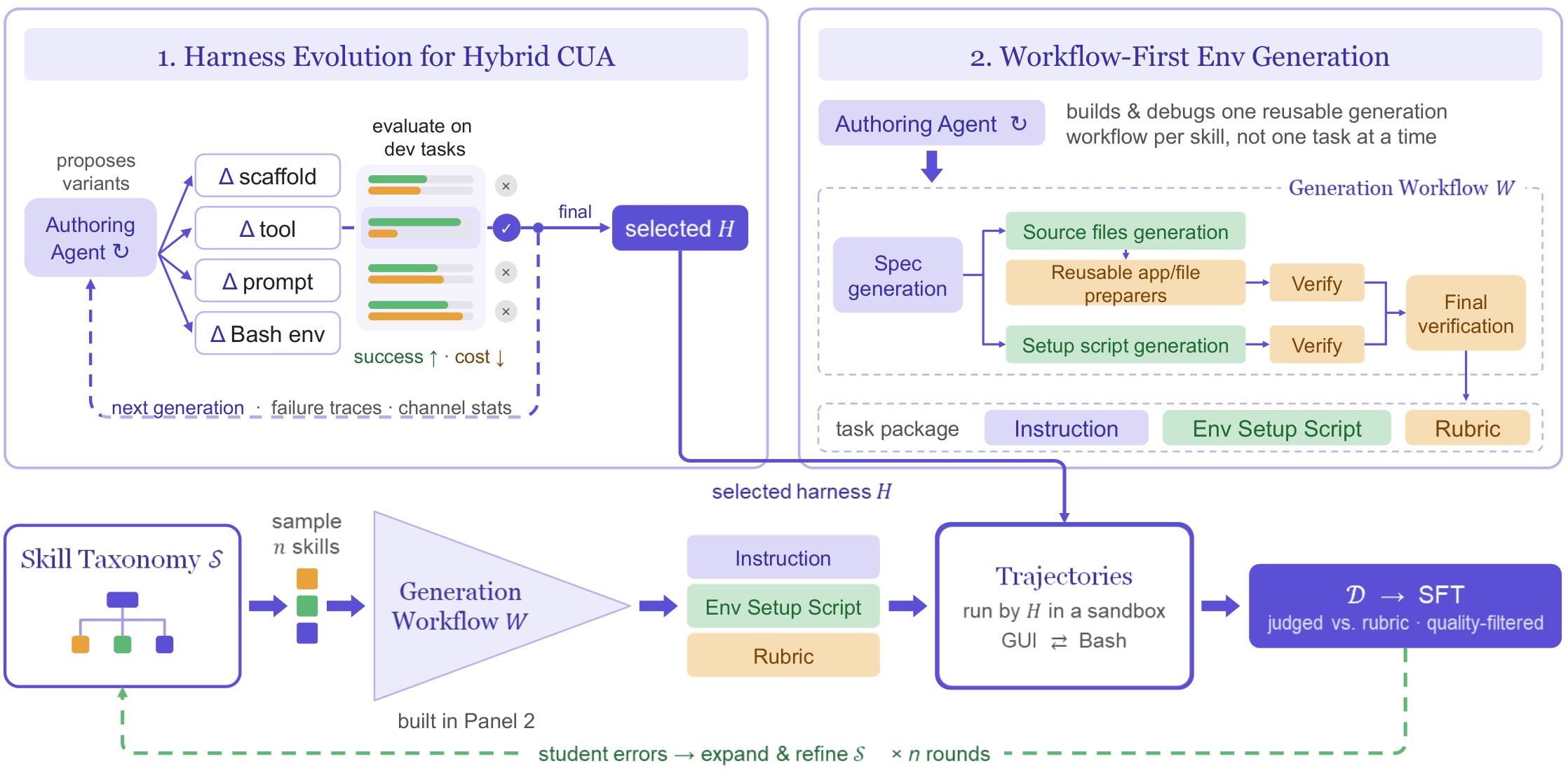
Microsoft's training recipe develops visual interaction and terminal capabilities before combining them through hybrid demonstrations and reinforcement learning. Reinforcement learning then uses task outcomes to improve the policy.
My reading is that tool availability and tool-use competence are separate problems. Giving a model two buttons does not teach it when to press each one.
Why improve the teacher's tools before training the student?#
The researchers also change the harness: the software that presents tools, manages context and runs the agent's actions.
Before collecting training examples, they refine the teacher's tool interfaces, prompts and execution environment. The technical report describes removing overlapping action routes and adding application-specific libraries.
That is an interesting place to spend effort. If the teacher takes an awkward route through a task, the student can learn that route too.
In the report's paired experiment, two students learn from teachers using different harnesses. On the same 672 held-out multi-application tasks, the student trained with the GUI-plus-coding teacher scores 37.6%, versus 25.1% for the version with an additional accessibility channel.
Those are separate experimental student results, not the final model's desktop benchmark score. They suggest that a more complicated tool menu can make learning harder in this setup. They do not establish that accessibility information is generally harmful.
What does the headline 66% actually measure?#
The published evaluation protocol reports 66.0% on OSWorld-Verified, averaged across two author-run evaluations of 361 tasks, excluding Google Drive, with a 50-step budget.
The two runs score 65.33% and 66.75%. “Two independent runs” here means separate runs by the authors, not replication by an independent evaluator.
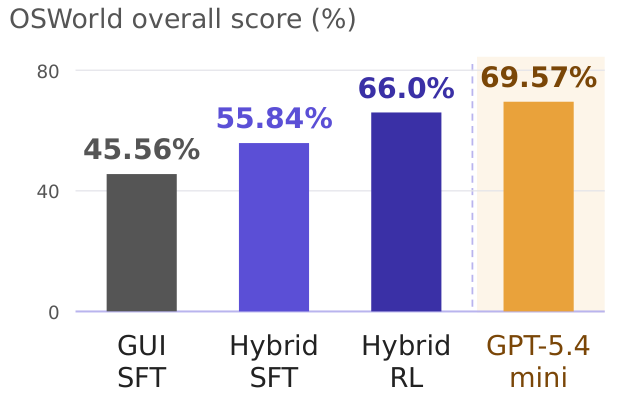
This is evidence about a particular model, harness, task set and budget. It is not a prediction that the agent will complete two out of every three tasks on an unfamiliar office computer.
The comparison table also mixes baseline settings reported by different projects. I would use it to identify systems worth testing, then compare them under matched conditions before making a deployment decision.
Can we see the routing choice in action?#
Microsoft's project page includes an original spreadsheet comparison video. Useful points in the inspected clip are:
| Video time | What is visible |
|---|---|
| 00 | Mage has closed the workbook; its trace describes preparing a file-based edit |
| 00 | The left trace contains Python tool entries; the right agent continues selecting cells |
| 00 | Mage's panel displays completion at 00 while the other panel remains active |
There are two qualifications I would keep beside this demonstration.
First, the inspected file lasts about 45 seconds. Microsoft's page reports a 9 finish for the other agent, but that finish is outside this preview. Second, Mage receives hybrid tools while Qwen3.6-27B is restricted to GUI actions. This illustrates different execution approaches; it does not isolate model size as the cause of the timing difference.
The completion banner is also an author-produced observation, not my verification of the saved workbook.
What happens when other people try it?#
As of November 1, I could not verify an independent full-benchmark reproduction or a detailed independent video test of this exact release in the sources checked.
The released reference harness makes follow-up testing more concrete. It does not turn the authors' results into outside validation. I have not run the model myself.
What would I test before connecting it to real work?#
I would start with disposable copies of files and a small task set that deliberately crosses the boundary between application state and stored state.
One task would require a structured edit. Another would depend on visual layout. A third would include an unsaved change that must survive. I would also include a failed command and check whether the agent notices and recovers.
Success would mean the required output exists, unchanged content remains intact, and the application can reopen it correctly. Click count and token count would help explain cost, but neither would substitute for checking the result.
For this kind of agent, permissions are part of the design too. A terminal can change much more than the document visible on screen. I would separate permission to edit working copies from permission to publish or modify shared originals.
So where is the engineering insight?#
What interests me most is that the work starts before the final model is trained: improve the execution environment, collect better examples and teach the model to move between complementary tools.
A desktop agent needs to understand where the current state lives and which action can change it reliably. Sometimes that means clicking. Sometimes it means code. Often it means using one route to do the work and another to check it.
The question I would bring to an application is: which parts of the workflow really require the screen, and which become simpler when we expose the underlying structure?
References
- 1.Mage-VL-Cowork model-weight release commit
Release date corroborated by the original repository's public commit metadata: October 30, 12:14:43 UTC.
- 2.Mage-VL-Cowork model card
Tool contract and evaluation protocol; current version checked November 1, 2026. Scores are author-reported.
- 3.Mage-VL-Cowork training and evaluation README
Five-stage curriculum, reference setup and reported experimental comparisons; accessed November 1, 2026.
- 4.Mage-VL-Cowork technical report
Section 6.7 and Table 5: 672-task teacher/student harness experiment. Separate from final OSWorld evaluation.
- 5.Mage-VL-Cowork project page and original figures
Original method and stage-performance images credited to Microsoft; demo comparison restrictions preserved.
- 6.Original spreadsheet hybrid-versus-GUI demo
Inspected at 00:15, 00:30 and 00:40. Approximately 45-second preview; not an independently reproduced speed comparison.
- 7.Released OSWorld evaluation reference
Reference harness, rather than an independent reproduction. Accessed November 1, 2026.
Continue exploring
- How Far Can an 8 MB Model Go Before You Need an LLM?Most AI applications today follow a pretty simple pattern: user says something → LLM understands it → LLM decides which tool to call. But do we really need a large language model for that entire…
- If AI Speeds Up Research, What Exactly Is Getting Faster?METR's November 5 assessment finds faster capability progress at Anthropic. Explore what that measures, why attribution remains uncertain, and how engineers can evaluate their own learning cycle.
- When Does an AI-Generated World Become a Useful Simulator?A practical look at Genie 4's interactive worlds, original comparison recordings, current limits and the tests needed before trusting a generated simulation.
- Can We Test an AI Agent's Safeguards Without Attacking Production?A practical look at Redwood's simulated control evaluations: how they test AI-agent safeguards, what the LinuxArena comparison shows, and why simulation still needs validation.