Can a Local AI Agent Do More Than Just Pick a Tool?
Liquid AI's new reasoning model makes local agents more interesting. But choosing a tool and finishing a task are different problems.
On this page
Most AI agents follow a familiar pattern:
A request goes to a model. The model chooses a tool. The application runs it. The result goes back to the model.
Usually, somewhere in that loop, we send our context to a cloud API.
But does the entire loop actually need to live there?
In my earlier Needle 3 article, I explored where a tiny local tool-calling model worked and where it started to struggle. The interesting boundary was between extracting an explicit action and interpreting what should happen.
Liquid AI's latest release brings that question back, with a different kind of model.
On October 13, 2026, the company released LFM2.5-24B-A2B, an open-weight model aimed at agents running on your own hardware. Its documentation describes roughly 24B total parameters, about 2B active per token, a 131K context window, and training for reasoning and multi-step tool use.
That sounds promising. But the question I find more useful is:
What does a local agent need to do beyond choosing the right tool?
Isn't choosing the tool already most of the job?#
Sometimes.
If I say:
Move invoice_104.pdf into the archive folder.
The action, the object, and the destination are already present.
Now change the request:
Archive invoices older than 90 days, but keep anything connected to an open project.
Consider this as an illustrative example.
The agent now needs to find invoices, inspect their dates, look up project status, apply the condition, and only then move the eligible files.
A perfectly formatted call to archive_invoice can still be wrong if the project is open.
That is the distinction I care about. Correct arguments matter, but so do the decision to act, the order of operations, and the ability to use what a previous tool returned.
So what is Liquid AI trying to change?#
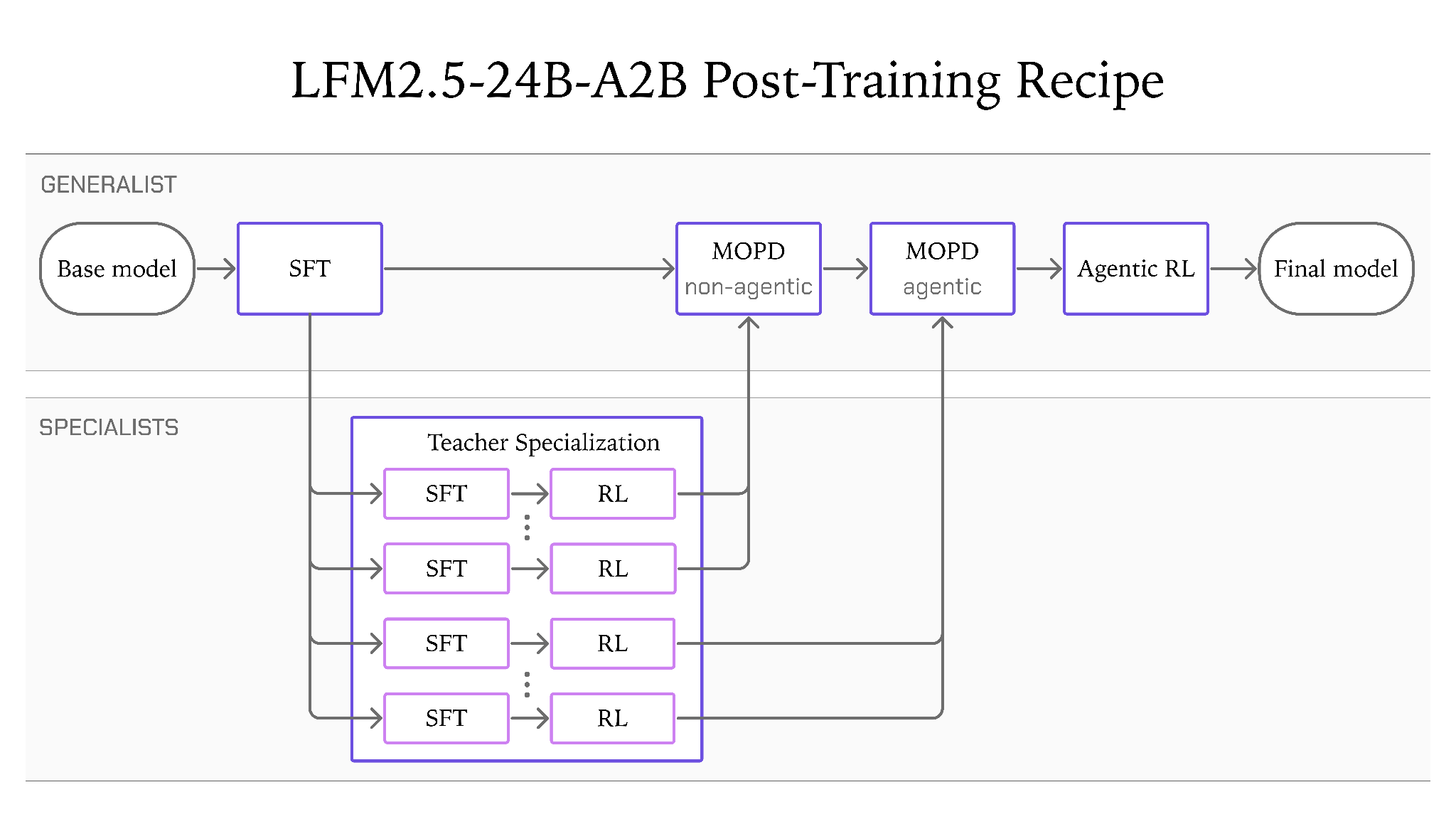
According to its release announcement, Liquid AI post-trained the model inside agent harnesses including Hermes Agent, OpenClaw, Pi, and OpenCode.
A harness is the surrounding application that gives the model tools, runs its actions, and carries results into the next step.
Training inside that loop is interesting because the job includes what happens after the first call. A tool can return incomplete information. A command can fail. The agent may need to revise its next action.
My interpretation is that Liquid AI is targeting a larger slice of the workflow than simple command extraction.
Whether it handles my workflow reliably still needs testing.
What do the published results actually tell us?#
Liquid AI reports these scores in its own evaluation:
| Benchmark | LFM2.5-24B-A2B | Qwen3.6-35B-A3B |
|---|---|---|
| AutomationBench | 27.69 | 8.72 |
| LiveClaw | 48.09 | 38.19 |
| WebArena Verified | 26.75 | 37.62 |
Source: Liquid AI's benchmark table and evaluation settings. These are vendor-reported benchmark scores; they are not measurements from my applications.
The first two rows look encouraging. The third points in the other direction.
That is useful.
It tells me to ask which benchmark resembles the work I want done. Organizing local files, operating a website, and fixing a repository are different workloads.
I wouldn't turn this table into one universal label such as “better agent.”
Can we actually see it working?#
Liquid AI includes a 37-second demo video in its release post. I inspected the clip; these are useful places to look:
| Time | What is visible |
|---|---|
| 00 | A Hugging Face model briefing in Telegram |
| 00 | A follow-up request in Hermes and Telegram |
| 00 | A terminal tool call and the follow-up response |
This is a company demonstration. An edited clip can illustrate a workflow, but it doesn't establish a success rate or reproduce a speed benchmark.
What happens when other people try it?#
The early community reports are mixed.
| Tester | Reported setup | Reported observation |
|---|---|---|
| u/repolevedd | Pi; QAD-Q4_0 checkpoint | Useful document and source-code extraction, with no loop observed during three hours of use |
| u/arbv | Q8_0 in a follow-up to their Pi testing | At least one looping incident |
| u/EmuHefty | Hermes; quantization and backend unspecified | A calendar scheduling task failed; the poster says Qwen3.6-35B handled it |
These are firsthand public reports accessed on October 14, 2026. They don't provide a controlled comparison with complete prompts, hardware, settings, and repeatable task counts. I haven't reproduced them.
I couldn't verify a detailed independent video test of this exact release in the sources I checked. The video above is Liquid AI's own demo.
My reading of these observations is that the surrounding setup deserves attention: checkpoint, serving backend, tool definitions, and harness behavior can all influence the outcome. The reports don't tell us which component caused each failure.
That makes the next step more concrete. I would reproduce the task and inspect the full tool trace before deciding that the model, or the whole idea of a local agent, had failed.
But if only 2B parameters are active, is it a 2B download?#
This is an easy detail to miss.
Active parameters describe part of the computation. Total parameters still matter for storing the weights.
Think of an office with many specialists. Only a few might work on the current request, but the others still need somewhere to exist.
Here is a rough storage calculation, not a measured memory requirement: if all 24 billion weights were stored at exactly four bits each, the weights alone would take about 12 GB in decimal units.
Real formats add overhead, some weights may use different precision, and running the model also needs memory for context and other state.
So the active-parameter number doesn't tell me whether it fits comfortably on my laptop.
I would check the actual model build, available memory, and performance at the context length I intend to use.
Where does the agent application fit?#
Liquid AI's local-agent guide describes serving a model through a local OpenAI-compatible endpoint, then connecting an agent harness to it.
That changes where inference happens. The surrounding application still has work to do.
For the invoice example, it must expose the necessary tools, return useful errors, enforce access rules, and confirm that files were actually moved.
If the application has no tool for looking up project status, a more capable model doesn't create that missing integration.
This is also where “local” needs a little care. Running the model locally can keep inference inputs away from a remote model provider. A tool that searches the web or calls a hosted business service still communicates with that service.
The privacy boundary depends on the whole workflow.
And how would I decide whether it is useful?#
I would start with a small set of tasks from the application I actually want to build:
- A direct command with all arguments present.
- A conditional request that requires reading state before acting.
- A task where a tool fails and the agent must recover.
- A request with missing information that should trigger a question.
- A longer task with several dependent actions.
Then I would measure completed tasks, incorrect actions, total time, and peak memory.
Liquid AI reports 184 tokens per second on an Apple M5 Max in its announcement. That is a hardware-specific result, not a prediction for my machine.
And token generation speed alone doesn't tell me how long the invoice task takes. Reasoning length, tool latency, retries, and the number of steps all contribute.
So can a local agent do more than pick a tool?#
Liquid AI is explicitly building toward that, and its published results make it worth investigating.
I haven't run LFM2.5-24B-A2B myself yet. This article combines the release documentation, a review of the official demo, attributed community reports, illustrative examples, and my own interpretation.
What interests me is the possibility of keeping more of an agent's working loop close to the application and its data.
The question I would test next is:
How much of a useful agent's work can stay on my own machine before it needs help from a larger system?
References
- 1.LFM2.5-24B-A2B: Built for Fast On-Device Agents
Primary release announcement; benchmark scores and hardware-specific speed are vendor-reported.
- 2.LFM2.5-24B-A2B — model documentation
Model specifications and reasoning behavior; accessed October 14, 2026.
- 3.Run local agents with LFMs
Primary documentation for connecting locally served models to agent harnesses; accessed October 14, 2026.
- 4.Official local Hermes Agent demo
Company demo; inspected at 00:08, 00:24 and 00:32. Not an independent benchmark.
- 5.Document and source-code extraction report in Pi
Firsthand anecdote; QAD-Q4_0 checkpoint. Accessed October 14, 2026.
- 6.Follow-up report of looping with Q8_0
Firsthand anecdote; uncontrolled test. Accessed October 14, 2026.
- 7.I tested LFM2.5-24B-A2B after all the Hype on X
Calendar failure report using Hermes; backend and quantization not specified. Accessed October 14, 2026.
Continue exploring
- How Far Can an 8 MB Model Go Before You Need an LLM?Most AI applications today follow a pretty simple pattern: user says something → LLM understands it → LLM decides which tool to call. But do we really need a large language model for that entire…
- How Does a Desktop AI Decide When to Click and When to Code?Mage-VL-Cowork combines screenshots and terminal execution in one small model. A practical look at its training recipe, official demo, reported OSWorld results and the state-management problem behind hybrid desktop agents.
- If AI Speeds Up Research, What Exactly Is Getting Faster?METR's November 5 assessment finds faster capability progress at Anthropic. Explore what that measures, why attribution remains uncertain, and how engineers can evaluate their own learning cycle.
- What Does a 44-Millisecond AI Decision Actually Buy You?Sarvam Prism returns decisions without generating text. Its B200 latency, probability fields and calibration tests reveal what engineers need to check before automating a workflow.